A user signs in to their Windows workstation in the morning. Later, they open a connected application in the browser and should not have to enter their password again. Kerberos makes it possible to reuse the existing Windows domain sign-in for this purpose.
In this case, the task was to connect an on-premises Active Directory to an external identity provider. The difficult part was not Single Sign-on itself, but maintaining a clean boundary between the internal network and the external service. The identity provider needed to identify a domain user securely without receiving the user’s password and without requiring a direct connection to the internal domain controllers.

The components
The Kerberos/SPNEGO integration required five things:
- a dedicated technical account in Active Directory,
- a unique Service Principal Name (SPN),
- a modern Kerberos encryption type,
- a keytab generated for the technical account,
- a test confirming that the domain controller issues a ticket for the service.
The technical account represents the connected service, not a person. The SPN is registered against this account. It is the unique Kerberos name by which the service is known within the domain. A typical principal follows a pattern such as HTTP/login.example.org@EXAMPLE.ORG.
The keytab contains the keys that allow the external identity provider to validate the Kerberos ticket presented by the client. It is not an ordinary configuration file. It contains sensitive key material and must be handled accordingly.
How the sign-in works
The flow is easier to understand from the client’s perspective:
- The user is already signed in to their Windows workstation and has a Ticket Granting Ticket for the domain.
- The user opens the connected service in a browser.
- The browser receives an SPNEGO challenge and requests a service ticket for the registered SPN from an internal domain controller.
- The browser sends that service ticket to the external identity provider.
- The identity provider validates the ticket using the imported keytab and passes the confirmed identity into its own authentication flow.
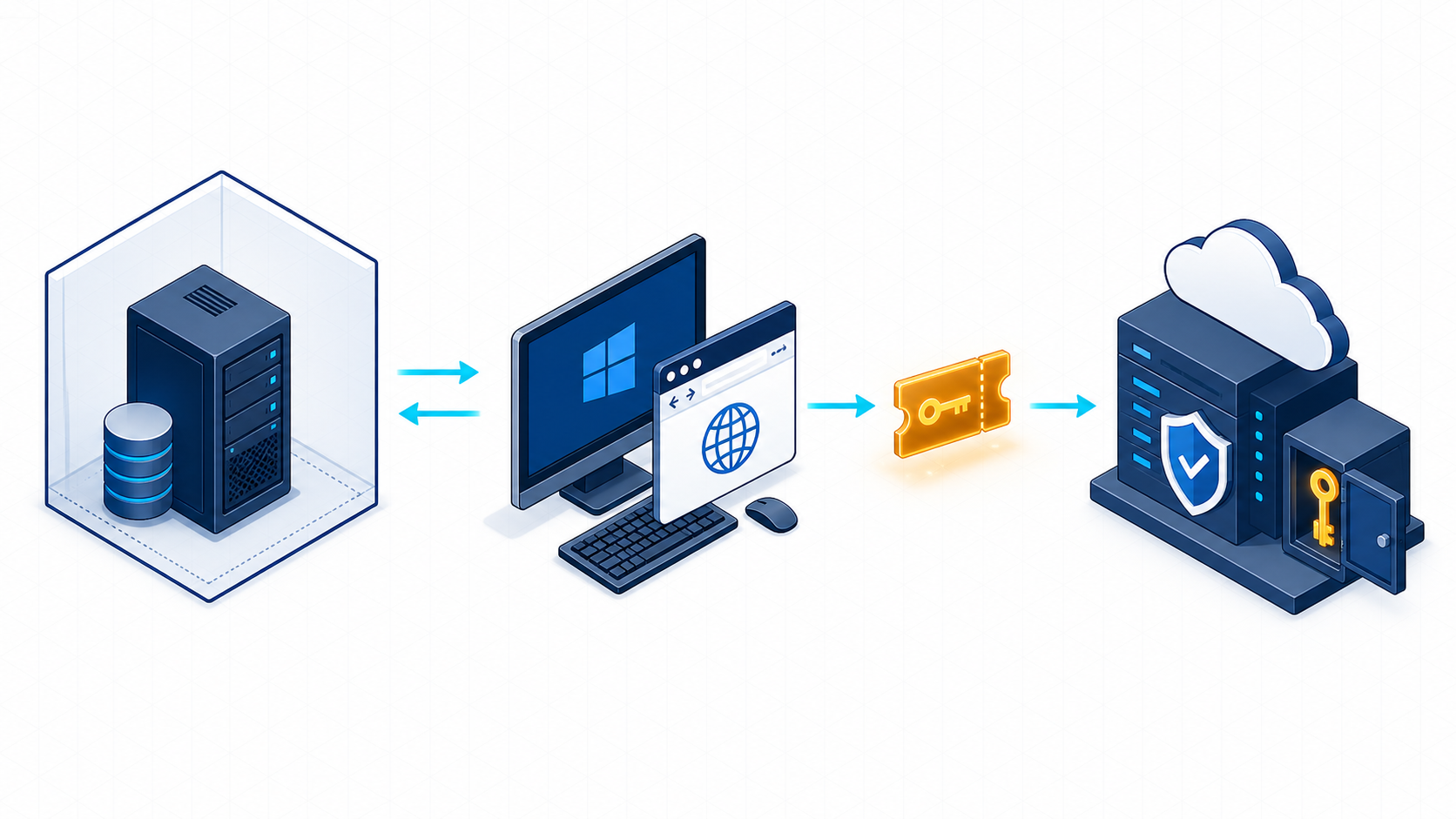
The important detail is that the external identity provider does not request the ticket from Active Directory. The Windows client does. The client can reach the domain controller on the internal network and then presents the resulting ticket to the external service over its existing browser connection.
In this design, the external service normally does not need a direct network connection to the internal domain controllers. The user’s password also never leaves the Windows client or Active Directory.
Why the configuration must be exact
Kerberos leaves little room for ambiguity. The service account, SPN, realm, hostname, and principal must match exactly. A different DNS name or an SPN assigned to the wrong account is enough to prevent the client from obtaining a suitable ticket or the identity provider from decrypting it.
The SPN must also be unique. An SPN may be assigned to only one account in Active Directory. Duplicate registrations cause failures that often appear in the browser as a broken SSO flow or another password prompt.
The keytab must match the current state of the technical account. It is derived from the account’s key material and contains a key version number, or KVNO. Changing the account password creates new keys. The existing keytab then becomes invalid and must be regenerated, transferred securely, and replaced at the identity provider.
The actual security boundary
Kerberos solves an important problem here: an external service can validate the identity of an already authenticated domain user without knowing the user’s password. That does not mean the integration is finished after the first successful test.
The keytab must be treated as a secret. Anyone who obtains it has access to the service account’s key material. It does not belong in a Git repository, a ticketing system, or an unprotected file share. Storage, transfer, and access should follow the same rules used for certificates with private keys and other production secrets.
The technical account should be restricted accordingly:
- It is used only for this service.
- It receives only the permissions it actually needs.
- Interactive sign-in is disabled where the environment allows it.
- Password changes and keytab replacement are documented as one operational process.
- Access to the account, keytab, and configuration is limited to the responsible people and systems.
Regular password rotation can be useful, but it must not happen in isolation. Without generating and deploying a new keytab at the same time, authentication will fail. Rotation therefore needs to be a planned and tested process, ideally with a short overlap if the identity provider supports multiple key versions.
What matters during testing
A successful browser request alone does not prove that Kerberos was used. An application may silently fall back to form-based authentication or another mechanism. Testing should therefore begin at the Kerberos layer.
First, verify that the SPN is unique and assigned to the correct technical account. Then request a service ticket for that SPN from a domain client and inspect the ticket cache. Only after the domain controller successfully issues the ticket does it make sense to troubleshoot the browser or identity provider.
On the receiving side, confirm that the principal, realm, encryption type, and KVNO match the imported keytab. The browser has its own SPNEGO requirements as well: it must trust the service, the hostname in the URL must match the SPN, and browser policies must permit integrated authentication for that address.
A useful troubleshooting order is:
- Check the DNS name and requested URL.
- Check that the SPN is unique and assigned to the correct account.
- Confirm that the client receives a service ticket.
- Compare the keytab’s principal, realm, encryption type, and KVNO.
- Check SPNEGO and browser policies.
- Only then investigate how the identity provider maps the Kerberos principal to a user.
This keeps troubleshooting focused. Starting with browser logs often mixes several layers together and sends the investigation in the wrong direction.
What this setup provides
The integration establishes a reliable basis for Integrated Windows Authentication:
- Users do not have to enter their password again.
- Authentication remains tied to the existing Windows domain.
- Accounts and password policies continue to be managed centrally in Active Directory.
- Connected applications do not need their own password store.
- The external service never receives the user’s password.
- Users get a largely seamless sign-in experience.
Kerberos does not replace a proper authorization model. It confirms the user’s identity. The identity provider or connected application still decides which application, role, or resource that user may access.
Conclusion
The underlying technology is well established, but the details determine whether the integration remains reliable. A unique SPN, a tightly restricted service account, modern encryption, and a controlled keytab rotation process are the essential pieces.
With those pieces in place, an external identity provider can use an existing Windows sign-in without collecting user passwords or connecting directly to internal domain controllers. The Windows client obtains the Kerberos ticket from the domain where it is already authenticated and passes that ticket to the service. That is the foundation of the intended Single Sign-on experience.